
FAQ
Hi, we’re so glad to have you here on the BOOPME™ Platform. We invite you to read through the FAQ below to have a better understanding of the features and functions of our platform.
If ever you do not find the answer to your question below, reach out through our contact form – we don’t bite.
Frequently asked questions
Is there a subscription fee?
There is no subscription fee to use our BOOPME™ service.
Do you need an app to use the BOOPME™ tag?
No app is required to use our tag as we wanted to make it accessible across all devices (whether someone owned a BOOPME™ tag or not). All that is required is an internet connection and smart device in order to customize and access your pet profile.
Do I need a tag in order to use the BOOPME™ platform?
Yes, you need to have a BOOPME™ tag in order to edit and customize your pet profile. This is a security measure we have implemented to ensure your information stays safe. You will not have access to the platform unless you have a tag. However, you do not need a tag in order to view the profile (that is, anyone with a smartphone device can view the profile when tapping the tag).
How can I activate my BOOPME™ tag?
To activate a tag, start by touching your phone on the tag, then proceed by following the steps on the screen to either:
1. Activate the tag to an existing account or;
2. Activate the tag to a new account.
You will require the activation code provided to you on the instruction card to proceed with either activation.
If you would like more detailed instructions click here.
Can I activate a new BOOPME™ tag to my existing account?
Absolutely! It is possible to manage multiple tags from one account – just make sure you select “Activate to existing account” when setting up your tag.
How do I edit my pet’s profile?
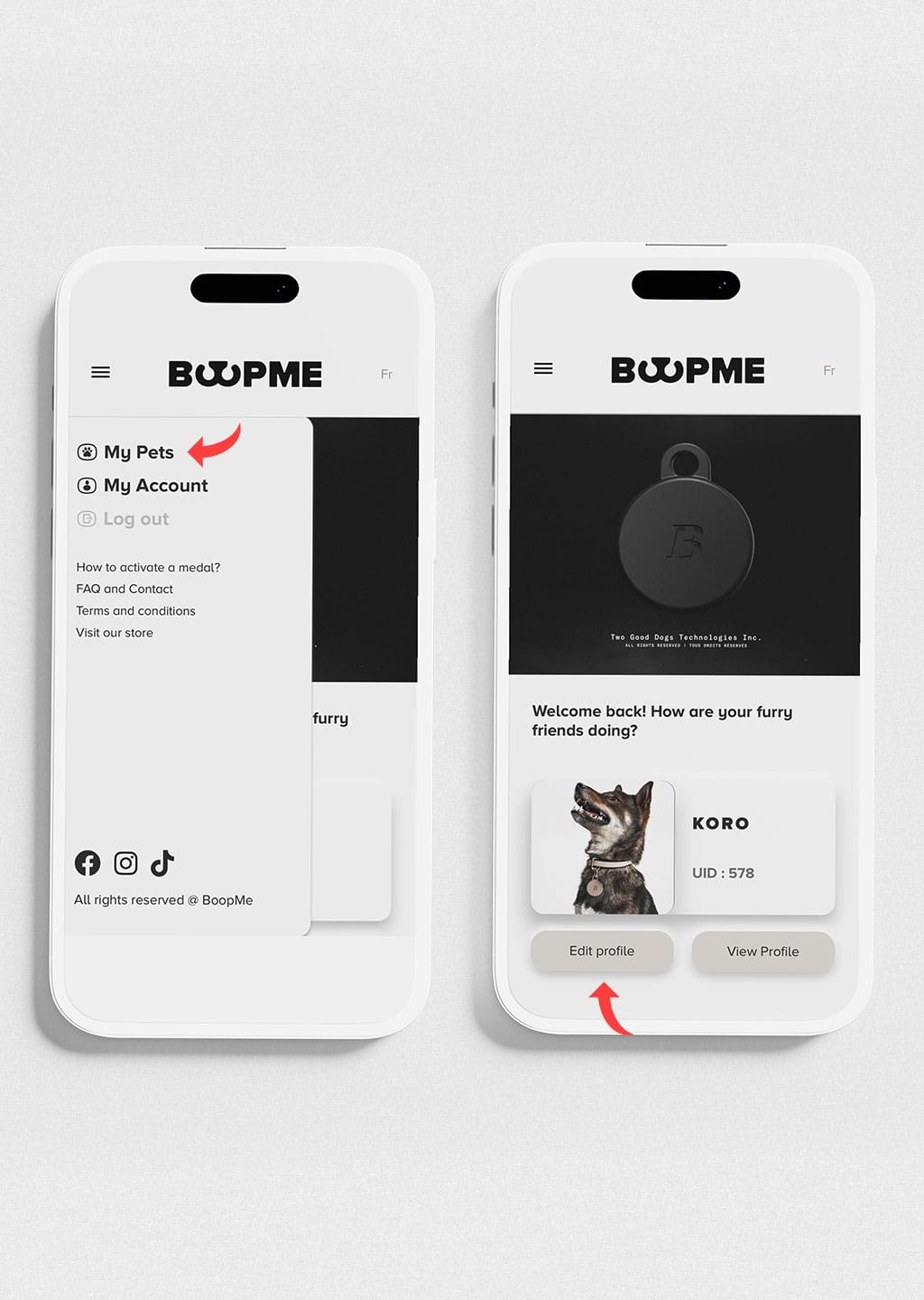
To edit your pet’s profile, click on “My pets” from the Menu. Once here, click on “Edit profile” for the pet’s profile you would like to edit. Do not forget to click save once you’re done!
What information is mandatory to be completed on my pet’s profile?
All the mandatory information is indicated with a red asterisks (*).
The information that is mandatory to complete are:
- Your pet’s basics – Pet name, gender, breed, date of birth, size, and colour;
- At least one method of contact – either phone number, email or address
How do I add/ remove a custom category?
Adding a category
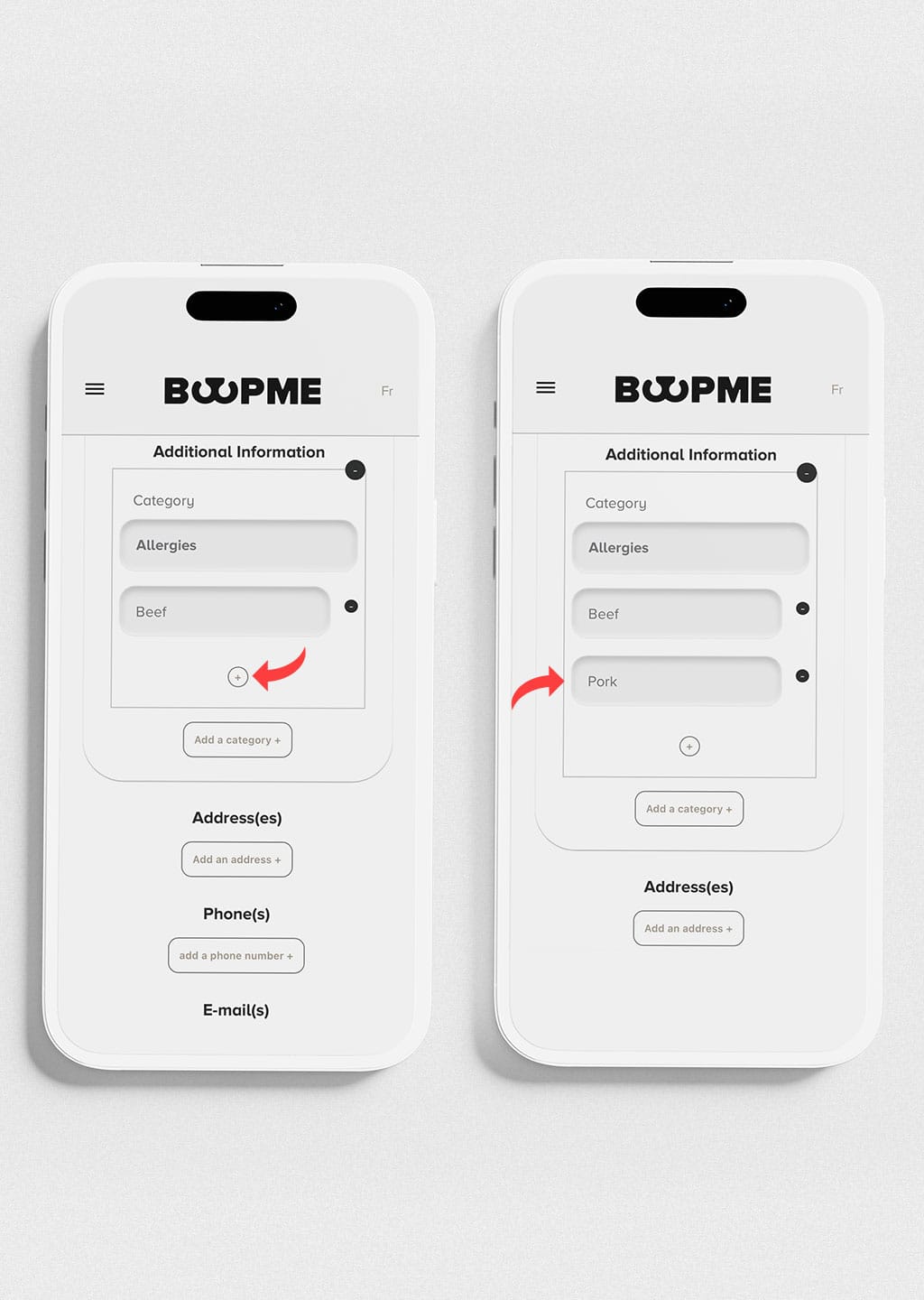
When in the “Edit profile”, click on “Add a category” in order to add a new category. From here, you can edit the title of your custom category under “Category” and edit the information you want to add.
Adding additional information on the category
If you want to add more information under one category, you can also add an additional text box to help with the organization of your pet’s profile. For example, if your pet has more than one allergy, you can click the (+) to add an additional text box.
Removing an information/ category
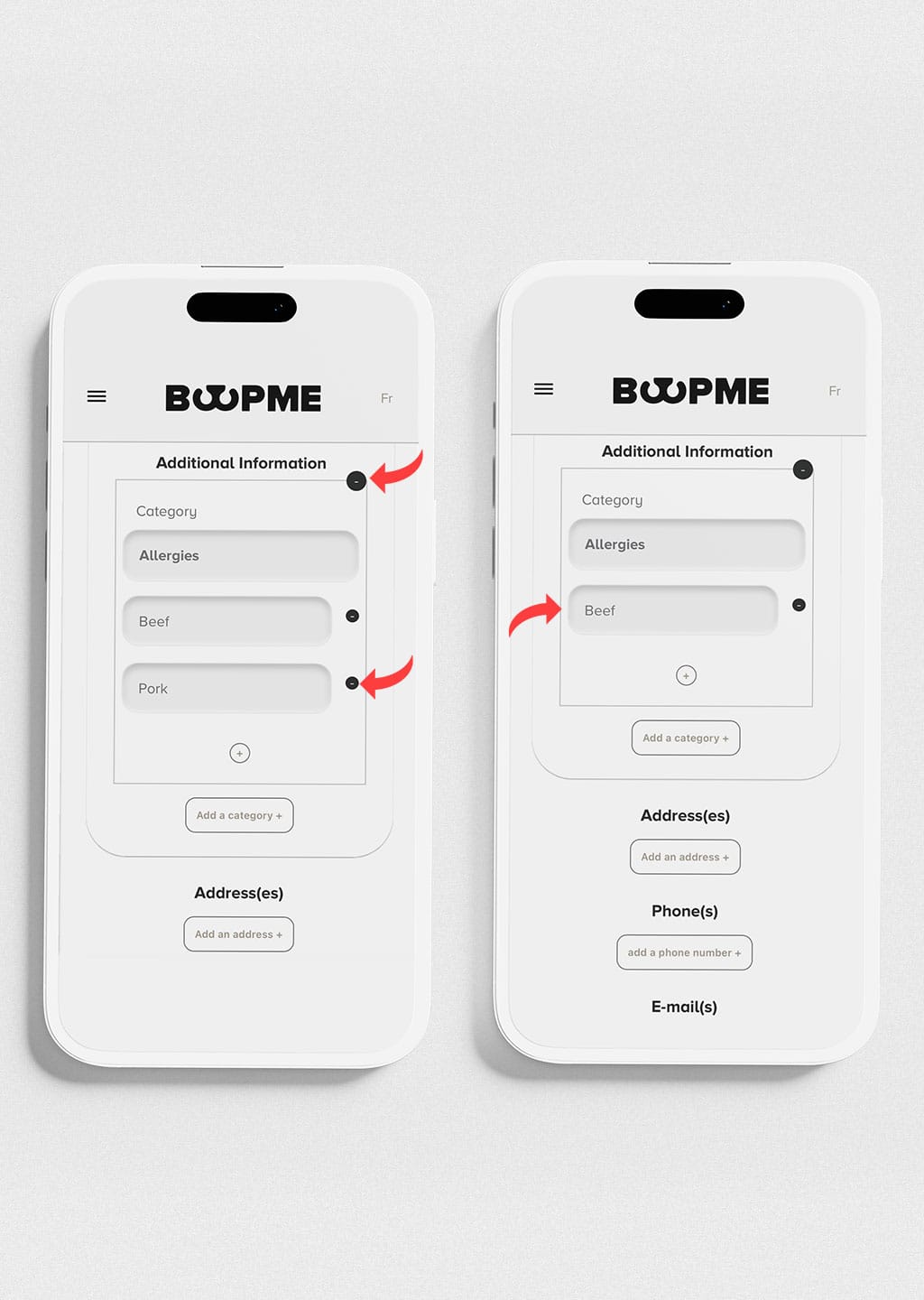
If you want to remove an information or category, click the (–) next to what you want to remove.
My pet is lost. How do I update their profile?
If your pet is lost, you may select the “My pet is lost” option while editing your pet’s profile. This will create a banner to appear on top of the picture of your pet’s profile. This change will appear to anyone scanning the tag. You can turn this on and off wherever you need – there is no limit to using this function.
What size picture should I use for my pet’s profile picture?
For best visibility, we recommend a picture that is square and that the animal is in the center so the whole picture may be seen when uploaded.
I have more than one tag for my pet. Can I merge the profiles?
At this moment of time, each tag will require a new profile to be completed for your pet. These profiles can be managed under the same account, just ensure to select “Activate to existing account” when setting up your tag.
I would like to deactivate my BOOPME™ tag, how do I proceed?
When we talk about deactivating your tag, this means you no longer want to use the tag for your pet (that is, you no longer want to use the BOOPME™ services). If this is what you are searching to do, you must go to….
IMPORTANT: In order to have an active BOOPME™ account, you must have at least one activated tag. This means that if you have only one tag under your account, and you decide to deactivate this one tag linked to your account, you will also be subsequently deleting your BOOPME™ account. If you have more than one tag under your BOOPME™ account, as long as one tag remains active, your account will also remain active.
How do I change my password?
To change your password, click the Menu and select “My account”. From here, you can change your password by typing a new password in the “Type new password” box.
How do I change the email address linked to my account?
To change the email address linked to your account, please contact us at contact@boopme.ca. We will have to do some verifications prior to proceeding with the change.